
Why local multicluster
Multicluster Kubernetes is easy to discuss but hard to understand without a lab. Kind gives a cheap way to run multiple clusters on one machine, and Cilium gives a modern networking layer for exploring service discovery, policies, and cross-cluster traffic.
The goal is not to build a production topology locally. The goal is to see the moving parts clearly.
Topology
The simple shape is two or more Kind clusters connected through Cilium. Each cluster has its own control plane and workloads, while Cilium handles the networking layer.
Create Kind clusters
Kind lets us create disposable Kubernetes clusters for experiments. For multicluster work, give each cluster a clear name and keep kubeconfig contexts separate.
kind create cluster --name c1
kind create cluster --name c2

kubectl config get-contexts
After both clusters exist, each one can receive its own CNI install and workload manifests.
Install Cilium
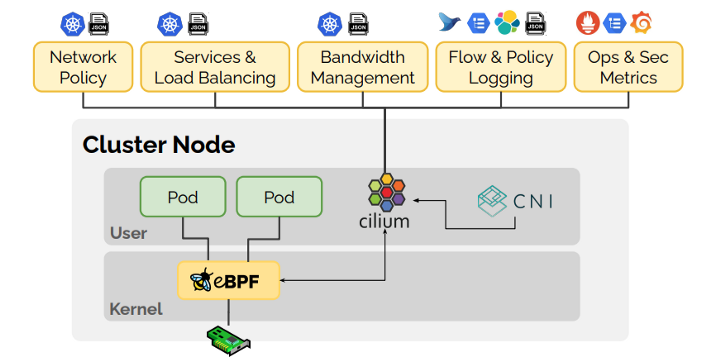
Cilium uses eBPF for networking, observability, and security policy. In local labs it is useful because it exposes how traffic flows through the cluster and gives a clean path to multicluster features.
cilium install --context kind-c1
cilium install --context kind-c2

cilium status --context kind-c1
cilium status --context kind-c2
Once Cilium is healthy on both clusters, you can start enabling multicluster connectivity and test service reachability.
Testing traffic
A good test is boring: deploy one service in one cluster and call it from a workload in the other cluster. Then inspect Cilium status, endpoints, and policies when something fails.
kubectl --context kind-c1 create deploy echo --image=nginx
kubectl --context kind-c1 expose deploy echo --port 80

kubectl --context kind-c2 run curl --image=curlimages/curl -it --rm -- sh
This is where the lab becomes useful. You can break DNS, policy, or routing intentionally and observe the failure mode.
Notes
- Keep cluster names and kubeconfig contexts obvious.
- Test single-cluster networking before enabling multicluster behavior.
- Use Cilium status and endpoint inspection early; do not debug blindly.
- Local labs are ideal for learning policy and routing behavior safely.
A local multicluster lab is valuable because it makes the network model visible before production adds cloud load balancers, DNS, and security controls.